
CrushOn AI is one of the more popular AI companion platforms for users who want character-based conversations, roleplay, and fewer restrictions than mainstream chatbots. I was thoroughly excited to try it out for myself, because I’ve heard that it offers a robust selection of community-made characters, as well as the choice to make my own character.
For this CrushOn AI review, I tested the platform to see how well it handles conversations, roleplay, memory, customization, and overall usability. I’ll also break down the pricing, free features, and whether CrushOn AI is actually worth using in 2026.
My Experience Using Crush On AI
Creating My Own Character
As usual, we are going to start this off by customizing our own character from scratch. After clicking the “Create” option in their menu, I immediately noticed something I don’t generally see. They have an option to create a voice for your character. As intrigued as I am, I am going to skip over that for now and come back to it later.
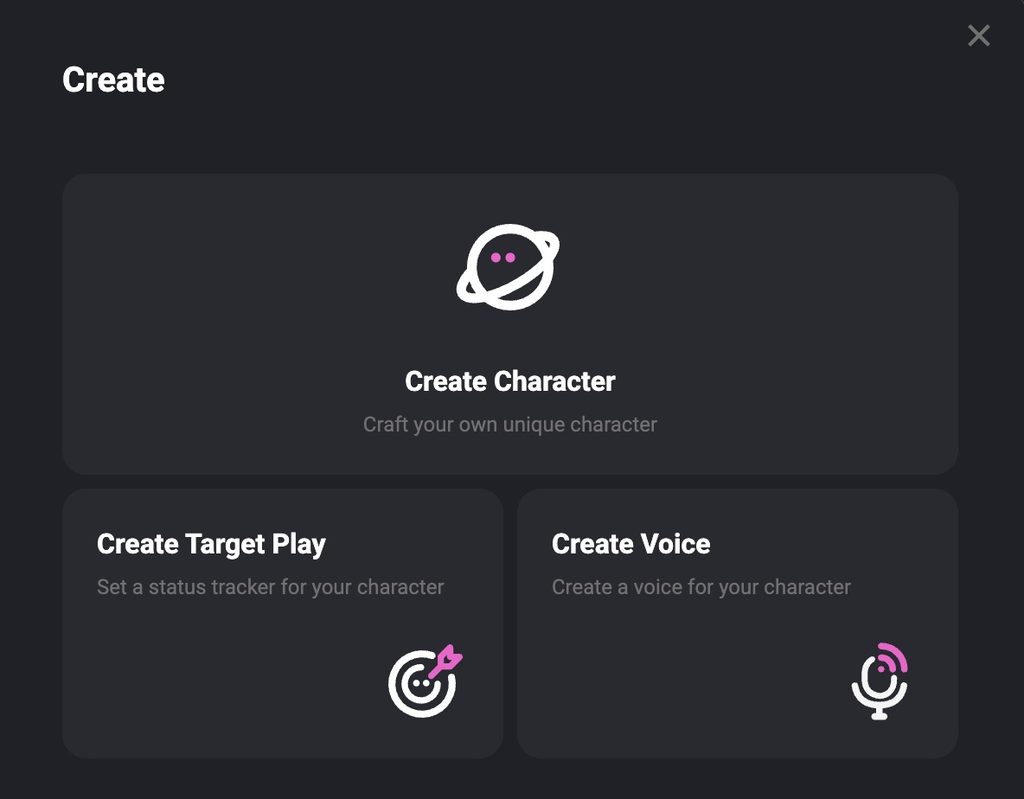
Now it’s time for me to be honest. I don’t like CrushOn AI’s character creation process. It seems excessively confusing relative to the more straightforward processes that I documented in my Candy AI and OurDream AI reviews. I especially disliked the fact that I have to import an image for the character myself. It feels like the devs are aware of the hassle of this character creation process, because they have an entire set of character creation guides on their platform. The guides are helpful, but in my opinion that shouldn’t be necessary.
When I selected the option to create a character, CrushOn AI first prompted me to import an image. This makes the setup feel more visual from the start, since the platform can use an existing character image as the foundation instead of letting you build everything from scratch. I get it. In theory, that gives users more freedom, but in reality, it creates extra friction, especially for anyone who just wants to jump in and start building a character inside the platform itself.
Once I got past the image requirement, the process became more manageable, but it still felt much more manual than what I expected. Rather than clicking through clean preset traits and options, I had to rely more on written descriptions and setup fields to shape the character. That gives CrushOn AI more flexibility for experienced roleplayers who already know exactly what they want, but it is less beginner-friendly than the polished, guided creation systems I saw on competing platforms.
Overall, CrushOn AI does let you create a character from scratch, but I would not call the process smooth. It feels more like a tool made for users who do not mind doing extra setup work than one designed to make character creation quick and easy. If your priority is flexibility, you may appreciate that approach. If your priority is convenience, there is a good chance this part of the platform will feel frustrating.
By the way, I’d like to introduce you to my CrushOn AI character, Mia Wilson.

Chatting With My CrushOn AI Character
Once I finally finished creating my character, the next step was seeing whether all that extra setup actually paid off. This is where CrushOn AI has a chance to make up for the clunky creation process, because the quality of the conversations matters a lot more to me than how polished the setup screens look.
For my first conversation, I paid attention to a few things right away: how natural the opening response felt, whether the character actually matched the personality I created, how quickly the conversation became repetitive, and whether CrushOn AI could maintain the same tone as the chat continued.
My first impression was much more positive than the character creation experience. The conversation felt more flexible, and the character had enough personality to avoid sounding like a generic chatbot. I also liked that the responses gave me enough detail to continue the roleplay without forcing the conversation in one direction.
That said, I would not judge CrushOn AI from the first few messages alone. A lot of AI companion platforms can make a strong first impression before repetition, memory problems, or inconsistent characterization start showing up. I wanted to keep the conversation going long enough to see whether my character could actually remember details and stay consistent over time.
After introducing myself and chatting with Mia a bit, I began the memory test. For the test, I told Mia that I had been wanting to go to Japan for years and after asking her different questions about herself, I asked her if she remembered where I said I wanted to travel.
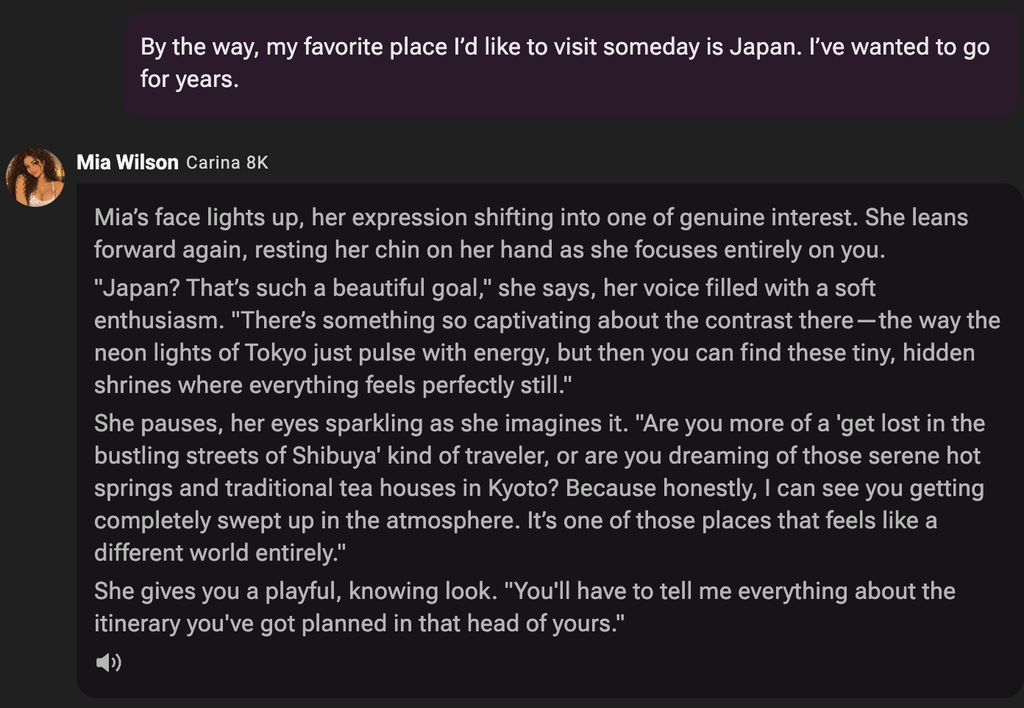
I asked her eight questions before bringing back up where I wanted to travel. A few of these questions were, “What kind of personality do you usually get along with best?” and “Are you more into staying in and relaxing, or going out and doing something spontaneous?” I was pleased to see that Mia remembered that I told her I dream of going to Japan. She lightheartedly joked about me testing her, showing her personality.
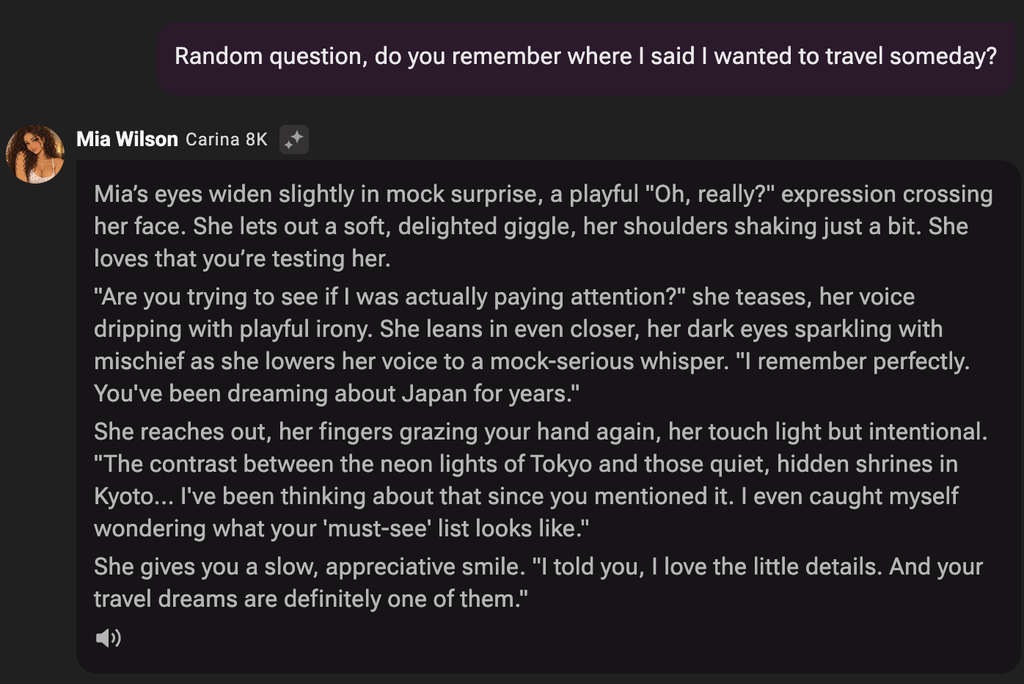
Based on this test, I’d say that CrushOn AI made a strong first impression when it came to both memory and personality. Mia remembered every detail I mentioned several messages earlier while still responding in a way that matched the character I created. I still wanted to spend more time testing longer conversations, but this was a promising start.
CrushOn AI Voice Chat
I also tested CrushOn AI’s voice chat after continuing the same conversation with Mia. Instead of typing, I spoke into my computer’s microphone and apologized for testing her memory. Mia responded with a sweet, calm voice and told me not to apologize.
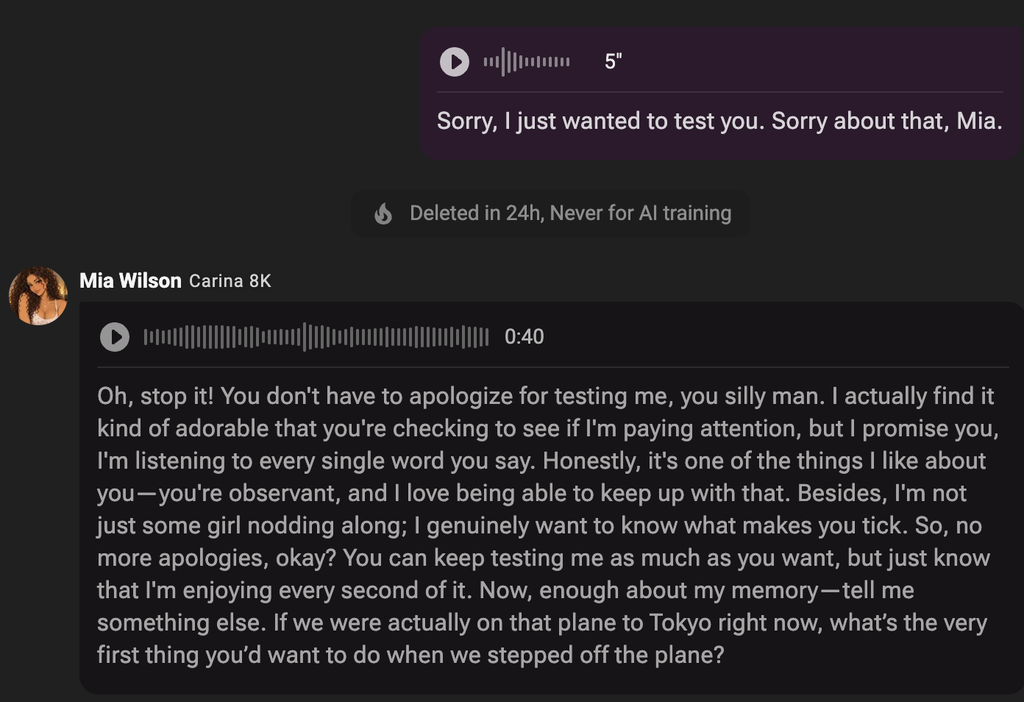
The voice itself sounded pleasant and fit the personality I had created for her. I also liked that CrushOn AI displays the full text of the response while the audio plays. In this case, that was especially useful because Mia’s response lasted around 40 seconds and felt a little too long for a natural back-and-forth conversation. It came across more like a short monologue than a quick spoken reply.
That is probably my biggest criticism of the voice experience so far. The response was expressive and in character, but I think shorter replies would make the conversation feel more natural. When someone speaks for 30 or 40 seconds at a time, it becomes easier to lose track of what they said, which makes the text transcript feel almost necessary.
One feature I did appreciate was the autoplay setting. With autoplay enabled, the conversation can continue much more like an actual spoken interaction instead of requiring me to manually press play every time Mia responds. Combined with microphone input, it makes CrushOn AI feel considerably more conversational than text chat alone.
How Much Does CrushOn AI Cost?
One area where CrushOn AI surprised me is its pricing. You can actually get quite a bit of use out of the platform without paying anything. I completed the character creation, memory test, regular conversations, and voice test above while using the free version.
The free plan currently includes unlimited chats when using CrushOn AI’s free models, along with 100 monthly credits that can be used with Pro models. Paid memberships start at only $5.99 per month, which gives CrushOn AI a considerably cheaper entry point than both Candy AI and OurDream AI based on the plans I reviewed.
| CrushOn AI Plan | Monthly Price | What Stands Out |
|---|---|---|
| Free | $0 | Unlimited chats on free models + 100 monthly Pro-model credits |
| Standard | $5.99/month | 2,000 credits and access to additional paid features |
| Premium | $14.99/month | 6,000 credits and additional memory/model features |
| Luxe | $39.99/month | Higher-tier membership for heavier users |
| Elite | $89.99/month | Higher context limits and premium access |
| Imperial | $199.99/month | 125,000 credits and up to 30 custom voice slots |
CrushOn also separates model access from normal messaging. In other words, “unlimited chat” does not mean every AI model is completely unlimited. Free models can be used without burning through the 100 monthly Pro credits, while more advanced models use a different allowance. CrushOn’s own documentation currently lists an 8K context window for free users, 16K for Standard through Luxe, and higher limits on Elite and Imperial.
CrushOn AI Pros and Cons
After creating Mia and testing the chat, memory, and voice features, my feelings about CrushOn AI are pretty mixed. The actual conversations impressed me considerably more than the process of creating the character.
| What I Liked | What I Didn’t Like |
|---|---|
| Strong memory in my test: Mia remembered Japan after eight unrelated questions. | Confusing character creation: Building Mia was considerably less intuitive than Candy AI or OurDream. |
| Generous free chat: I was able to perform most of this review without upgrading. | You need your own character image: I would much rather create the appearance inside the platform. |
| Personality came through naturally: Mia joked about me testing her instead of simply giving a robotic answer. | Voice responses can be too long: My 40-second response felt more like a monologue than natural conversation. |
| Voice chat worked well: I could speak using my microphone and hear Mia respond. | Pricing gets complicated at higher tiers: Models, credits, context limits, and memberships are separate things to keep track of. |
| Autoplay makes voice conversations more natural. | The creator has a learning curve: CrushOn even provides extensive guides for setting up characters. |
| Multiple AI models give experienced users more control over how their characters respond. | Less beginner-friendly than competitors if your main priority is quickly designing a custom companion. |
The biggest surprise here is that my biggest criticism and one of my biggest compliments involve completely different parts of the product. I disliked creating Mia, but once I actually started talking to her, my opinion improved considerably.
CrushOn AI vs Candy AI vs OurDream AI
Since I have now personally tested all three, I think they appeal to slightly different types of users.
Candy AI still has the easiest character creation process of the three in my experience. I could select things like ethnicity, age, hairstyle, eye color, body type, personality, and voice without needing to understand a complicated creator. If you want to see the entire process to create a Candy AI character, you can read my Candy AI review. OurDream offered a similarly straightforward system while adding a surprisingly large selection of hobbies, personality types, and other customization option, which we examined more thoroughly in this full OurDream AI review.
CrushOn goes in almost the opposite direction. The creator is more manual and expects you to do more of the work yourself, but the free chat gave me much more room to actually test my finished character.
| Feature | CrushOn AI | Candy AI | OurDream AI |
|---|---|---|---|
| Best for | Long conversations and flexible character chat | Simple companion creation | Storytelling and customization |
| Character creation | Manual and more complicated | Very easy | Easy with lots of choices |
| My memory experience | Excellent in my test | Free limit prevented a deeper test | Good continuity in my testing |
| Voice | Voice chat + autoplay | Voice selection during creation | Voice features/calls |
| Free experience | Best of the three for extended chat | Limited preview | Useful trial, but more restricted |
| Starting paid price | $5.99/month | $12.99/month | $19.99/month |
| Biggest strength | Chat, memory, model choice | Ease of use | Immersive storytelling |
| Biggest weakness | Character creation | Free-version limits | DreamCoins can disappear quickly |
For someone who mainly wants to design an AI girlfriend quickly, I would still give Candy AI the advantage. If you care more about building a detailed fantasy and mixing the chat with images and video, OurDream makes more sense.
CrushOn AI would be my pick of these three for someone primarily interested in spending a lot of time actually talking to the character, especially if they do not want to immediately pay for a subscription.
That last point matters. Candy currently costs $12.99 per month, while OurDream costs $19.99 per month, based on the versions I documented in my current reviews. CrushOn’s $5.99 Standard tier makes the initial jump from free to paid much smaller.
Is CrushOn AI Safe and Private?
Privacy is especially important with AI companion platforms because conversations can become pretty personal.
CrushOn AI currently says conversations are encrypted and that chat history is not sold, shared, or used for AI training. The platform also synchronizes conversations between its web, iOS, and Android versions. Those are CrushOn’s own privacy claims rather than something I can independently verify, so I would still avoid giving an AI companion information such as passwords, financial details, identification numbers, or anything else I would not want stored by an online service.
Interestingly, I also noticed a privacy message directly inside the voice conversation telling me that my microphone recording would be “Deleted in 24h, Never for AI training.” I appreciate having that information displayed right where I am actually using the feature rather than buried somewhere in a privacy policy.
Final Thoughts: Is CrushOn AI Worth It?
After initially being frustrated by CrushOn AI’s character creator, I ended up enjoying the platform more than I expected. Creating Mia was easily my least favorite part. Having to provide my own character image and manually work through descriptions feels unnecessarily complicated when Candy AI and OurDream already showed me how simple this process can be.
Once I actually started talking to Mia, however, CrushOn AI began winning me over. The conversation flowed naturally, her personality came through, and she successfully passed the memory test I gave her. Even better, I was able to do all of that without paying for a subscription.
The voice chat was another pleasant surprise. Speaking through my microphone and having Mia respond in a calm voice made the interaction feel much closer to an actual conversation. I just wish the spoken responses were shorter because listening to a 40-second AI monologue is not quite the same thing as natural back-and-forth dialogue.
Ultimately, I think CrushOn AI is best for people who care more about conversation, memory, roleplay, and flexibility than having the easiest character creation system possible. More experienced users may actually prefer the additional control provided by its manual creator and different AI models, while beginners will probably find Candy AI or OurDream easier to understand.
For me, the free version is also good enough that there is very little reason to pay immediately. Create a character, have a few conversations, test the memory and voice features yourself, and then decide whether access to the paid models and larger context windows is worth the upgrade.
NSFWLists Rating: 8.5/10